Sign up - Done
Method 1 - Email Verification
Description
EveryAnswer method. User provides email only to sign-up and is sent a link. They must click the link to verify their email and be taken by token to a page to complete their sign-up.
Step 1
Description
Handled outside the platform, such as on a website. The email address is sent to an API which sends a welcome email to user with a verification request.
Step 2
Description
From the email the user is sent, once they click on the verification link they are sent here.
HTML
<body>
<div class="auth-page-wrapper">
<div class="modal-container">
<div class="modal-logo-container">
<img loading="lazy" src="{app logo}" alt="{app name}">
</div>
<div class="modal-heading-container">
<h1 class="modal-h1">Sign up</h1>
<div>
Already have an Account? <a href="#">Sign In</a>
</div>
</div>
<div class="auth-form">
<form name="Sign-up" data-name="Sign-up" method="post" class="form">
<div class="form-field-container">
<div class="field-label-container">
<label for="First-Name" class="field-label">Your Name</label>
<div class="required-star">*</div>
</div>
<input class="form-field w-input" maxlength="256" name="First-Name" data-name="First Name" placeholder="First name " type="text" id="First-Name" required="">
<input class="form-field w-input" maxlength="256" name="Last-Name" data-name="Last Name" placeholder="Last name" type="text" id="Last-Name" required="">
</div>
<div class="form-field-container">
<div class="field-label-container">
<label for="Workspace-Name" class="field-label">Workspace Name</label>
<div class="required-star">*</div>
</div>
<input class="form-field w-input" maxlength="256" name="Workspace-Name" placeholder="Choose a name" type="text" value="My Workspace" required="">
</div>
<div class="form-field-container">
<div class="field-label-container"><label for="Locale" class="field-label">Your Locale</label>
<div class="required-star">*</div>
</div>
<div data-delay="0" data-hover="false" class="dropdown w-dropdown">
<div class="dropdown-closed w-dropdown-toggle">
<div class="dropdown-arrow w-icon-dropdown-toggle"></div>
<div class="dropdown-text">Select one...</div>
</div>
<div class="dropdown-open w-dropdown-list">
<div class="dropdown-filter">
<input class="dropdown-filter-input w-input" maxlength="256" name="Dropdown-Filter" placeholder="Filter" type="text"></div>
<div class="dropdown-options">
<a href="#" class="dropdown-option w-inline-block">
<div class="dropdown-option-selected-icon-container">
<div class="dropdown-option-selected-icon selected w-embed">
<svg xmlns="http://www.w3.org/2000/svg" width="24" height="24" viewbox="0 0 24 24" fill="none" stroke="currentColor" stroke-width="4" stroke-linecap="round" stroke-linejoin="round">
<polyline points="20 6 9 17 4 12"></polyline>
</svg>
</div>
</div>
<div class="dropdown-option-text">United States</div>
</a>
<a href="#" class="dropdown-option w-inline-block">
<div class="dropdown-option-selected-icon-container">
<div class="dropdown-option-selected-icon w-embed">
<svg xmlns="http://www.w3.org/2000/svg" width="24" height="24" viewbox="0 0 24 24" fill="none" stroke="currentColor" stroke-width="2" stroke-linecap="round" stroke-linejoin="round">
<polyline points="20 6 9 17 4 12"></polyline>
</svg>
</div>
</div>
<div class="dropdown-option-text">Canada</div>
</a>
</div>
</div>
</div>
</div>
<div class="form-field-container">
<div class="field-label-container"><label for="Password" class="field-label">Password</label>
<div class="required-star">*</div>
<div data-placement="right" data-tippy-content="Your password must meet the following requirements: at least 8 characters in length, contain at least one uppercase letter (A-Z), contain at least one lowercase letter (a-z), include at least one number (0-9), and include at least one special symbol (e.g., !, @, #, $)." class="help-tooltip w-embed">
<svg xmlns="http://www.w3.org/2000/svg" width="24" height="24" viewbox="0 0 24 24" fill="none" stroke="currentColor" stroke-width="2" stroke-linecap="round" stroke-linejoin="round">
<circle cx="12" cy="12" r="10"></circle>
<path d="M9.09 9a3 3 0 0 1 5.83 1c0 2-3 3-3 3"></path>
<line x1="12" y1="17" x2="12.01" y2="17"></line>
</svg>
</div>
</div>
<input class="form-field w-input" maxlength="256" name="Password" placeholder="Choose a Password" type="password" required="">
<input class="form-field w-input" maxlength="256" name="Confirm-Password" placeholder="Confirm Your Password" type="password" required="">
</div>
<div class="w-layout-grid grid-2---10px">
<div class="password-verification">
<div class="password-verification-option">
<div class="password-verification-icon verified w-embed">
<!-- START SVG for when password requirement NOT MET -->
<svg fill="currentColor" xmlns="http://www.w3.org/2000/svg" width="32" height="32" viewbox="0 0 32 32">
<path d="M16,2A14,14,0,1,0,30,16,14,14,0,0,0,16,2ZM14,21.5908l-5-5L10.5906,15,14,18.4092,21.41,11l1.5957,1.5859Z"></path>
<polygon id="inner-path" fill="none" points="14 21.591 9 16.591 10.591 15 14 18.409 21.41 11 23.005 12.585 14 21.591">
</polygon></svg>
<!-- END SVG for when password requirement IS met -->
</div>
</div>
<div>One lowercase character</div>
</div>
<div class="password-verification">
<div class="password-verification-option">
<div class="password-verification-icon w-embed">
<!-- START SVG for when password requirement is NOT MET -->
<svg fill="currentColor" width="32" height="32" xmlns="http://www.w3.org/2000/svg" viewbox="0 0 32 32">
<path d="M7.7,4.7a14.7,14.7,0,0,0-3,3.1L6.3,9A13.26,13.26,0,0,1,8.9,6.3Z"></path>
<path d="M4.6,12.3l-1.9-.6A12.51,12.51,0,0,0,2,16H4A11.48,11.48,0,0,1,4.6,12.3Z"></path>
<path d="M2.7,20.4a14.4,14.4,0,0,0,2,3.9l1.6-1.2a12.89,12.89,0,0,1-1.7-3.3Z"></path>
<path d="M7.8,27.3a14.4,14.4,0,0,0,3.9,2l.6-1.9A12.89,12.89,0,0,1,9,25.7Z"></path>
<path d="M11.7,2.7l.6,1.9A11.48,11.48,0,0,1,16,4V2A12.51,12.51,0,0,0,11.7,2.7Z"></path>
<path d="M24.2,27.3a15.18,15.18,0,0,0,3.1-3.1L25.7,23A11.53,11.53,0,0,1,23,25.7Z"></path>
<path d="M27.4,19.7l1.9.6A15.47,15.47,0,0,0,30,16H28A11.48,11.48,0,0,1,27.4,19.7Z"></path>
<path d="M29.2,11.6a14.4,14.4,0,0,0-2-3.9L25.6,8.9a12.89,12.89,0,0,1,1.7,3.3Z"></path>
<path d="M24.1,4.6a14.4,14.4,0,0,0-3.9-2l-.6,1.9a12.89,12.89,0,0,1,3.3,1.7Z"></path>
<path d="M20.3,29.3l-.6-1.9A11.48,11.48,0,0,1,16,28v2A21.42,21.42,0,0,0,20.3,29.3Z"></path>
</svg>
<!-- END SVG for when password requirement is NOT MET -->
</div>
</div>
<div>One number</div>
</div>
<div class="password-verification">
<div class="password-verification-option">
<div class="password-verification-icon w-embed">
<!-- START SVG for when password requirement is NOT MET -->
<svg fill="currentColor" width="32" height="32" xmlns="http://www.w3.org/2000/svg" viewbox="0 0 32 32">
<path d="M7.7,4.7a14.7,14.7,0,0,0-3,3.1L6.3,9A13.26,13.26,0,0,1,8.9,6.3Z"></path>
<path d="M4.6,12.3l-1.9-.6A12.51,12.51,0,0,0,2,16H4A11.48,11.48,0,0,1,4.6,12.3Z"></path>
<path d="M2.7,20.4a14.4,14.4,0,0,0,2,3.9l1.6-1.2a12.89,12.89,0,0,1-1.7-3.3Z"></path>
<path d="M7.8,27.3a14.4,14.4,0,0,0,3.9,2l.6-1.9A12.89,12.89,0,0,1,9,25.7Z"></path>
<path d="M11.7,2.7l.6,1.9A11.48,11.48,0,0,1,16,4V2A12.51,12.51,0,0,0,11.7,2.7Z"></path>
<path d="M24.2,27.3a15.18,15.18,0,0,0,3.1-3.1L25.7,23A11.53,11.53,0,0,1,23,25.7Z"></path>
<path d="M27.4,19.7l1.9.6A15.47,15.47,0,0,0,30,16H28A11.48,11.48,0,0,1,27.4,19.7Z"></path>
<path d="M29.2,11.6a14.4,14.4,0,0,0-2-3.9L25.6,8.9a12.89,12.89,0,0,1,1.7,3.3Z"></path>
<path d="M24.1,4.6a14.4,14.4,0,0,0-3.9-2l-.6,1.9a12.89,12.89,0,0,1,3.3,1.7Z"></path>
<path d="M20.3,29.3l-.6-1.9A11.48,11.48,0,0,1,16,28v2A21.42,21.42,0,0,0,20.3,29.3Z"></path>
</svg>
<!-- END SVG for when password requirement is NOT MET -->
</div>
</div>
<div>One uppercase character</div>
</div>
<div class="password-verification">
<div class="password-verification-option">
<div class="password-verification-icon w-embed">
<!-- START SVG for when password requirement is NOT MET -->
<svg fill="currentColor" width="32" height="32" xmlns="http://www.w3.org/2000/svg" viewbox="0 0 32 32">
<path d="M7.7,4.7a14.7,14.7,0,0,0-3,3.1L6.3,9A13.26,13.26,0,0,1,8.9,6.3Z"></path>
<path d="M4.6,12.3l-1.9-.6A12.51,12.51,0,0,0,2,16H4A11.48,11.48,0,0,1,4.6,12.3Z"></path>
<path d="M2.7,20.4a14.4,14.4,0,0,0,2,3.9l1.6-1.2a12.89,12.89,0,0,1-1.7-3.3Z"></path>
<path d="M7.8,27.3a14.4,14.4,0,0,0,3.9,2l.6-1.9A12.89,12.89,0,0,1,9,25.7Z"></path>
<path d="M11.7,2.7l.6,1.9A11.48,11.48,0,0,1,16,4V2A12.51,12.51,0,0,0,11.7,2.7Z"></path>
<path d="M24.2,27.3a15.18,15.18,0,0,0,3.1-3.1L25.7,23A11.53,11.53,0,0,1,23,25.7Z"></path>
<path d="M27.4,19.7l1.9.6A15.47,15.47,0,0,0,30,16H28A11.48,11.48,0,0,1,27.4,19.7Z"></path>
<path d="M29.2,11.6a14.4,14.4,0,0,0-2-3.9L25.6,8.9a12.89,12.89,0,0,1,1.7,3.3Z"></path>
<path d="M24.1,4.6a14.4,14.4,0,0,0-3.9-2l-.6,1.9a12.89,12.89,0,0,1,3.3,1.7Z"></path>
<path d="M20.3,29.3l-.6-1.9A11.48,11.48,0,0,1,16,28v2A21.42,21.42,0,0,0,20.3,29.3Z"></path>
</svg>
<!-- END SVG for when password requirement is NOT MET -->
</div>
</div>
<div>One symbol</div>
</div>
<div class="password-verification">
<div class="password-verification-option">
<div class="password-verification-icon w-embed">
<!-- START SVG for when password requirement is NOT MET -->
<svg fill="currentColor" width="32" height="32" xmlns="http://www.w3.org/2000/svg" viewbox="0 0 32 32">
<path d="M7.7,4.7a14.7,14.7,0,0,0-3,3.1L6.3,9A13.26,13.26,0,0,1,8.9,6.3Z"></path>
<path d="M4.6,12.3l-1.9-.6A12.51,12.51,0,0,0,2,16H4A11.48,11.48,0,0,1,4.6,12.3Z"></path>
<path d="M2.7,20.4a14.4,14.4,0,0,0,2,3.9l1.6-1.2a12.89,12.89,0,0,1-1.7-3.3Z"></path>
<path d="M7.8,27.3a14.4,14.4,0,0,0,3.9,2l.6-1.9A12.89,12.89,0,0,1,9,25.7Z"></path>
<path d="M11.7,2.7l.6,1.9A11.48,11.48,0,0,1,16,4V2A12.51,12.51,0,0,0,11.7,2.7Z"></path>
<path d="M24.2,27.3a15.18,15.18,0,0,0,3.1-3.1L25.7,23A11.53,11.53,0,0,1,23,25.7Z"></path>
<path d="M27.4,19.7l1.9.6A15.47,15.47,0,0,0,30,16H28A11.48,11.48,0,0,1,27.4,19.7Z"></path>
<path d="M29.2,11.6a14.4,14.4,0,0,0-2-3.9L25.6,8.9a12.89,12.89,0,0,1,1.7,3.3Z"></path>
<path d="M24.1,4.6a14.4,14.4,0,0,0-3.9-2l-.6,1.9a12.89,12.89,0,0,1,3.3,1.7Z"></path>
<path d="M20.3,29.3l-.6-1.9A11.48,11.48,0,0,1,16,28v2A21.42,21.42,0,0,0,20.3,29.3Z"></path>
</svg>
<!-- END SVG for when password requirement is NOT MET -->
</div>
</div>
<div>8 characters minimum</div>
</div>
</div>
<div class="form-field-container">
<label class="w-checkbox checkbox-field">
<div class="w-checkbox-input w-checkbox-input--inputType-custom checkbox"></div>
<input type="checkbox" name="Accept-Terms" id="Accept-Terms" style="opacity:0;position:absolute;z-index:-1">
<span class="checkbox-label w-form-label" for="Accept-Terms">I accept the <a href="#">Terms & Conditions</a></span>
</label>
</div>
<div class="form-button-container">
<input type="submit" data-wait="Processing... Please wait" class="button full w-button" value="Sign in">
</div>
</form>
</div>
</div>
</div>
</body>
Method 2 - Basic
Description
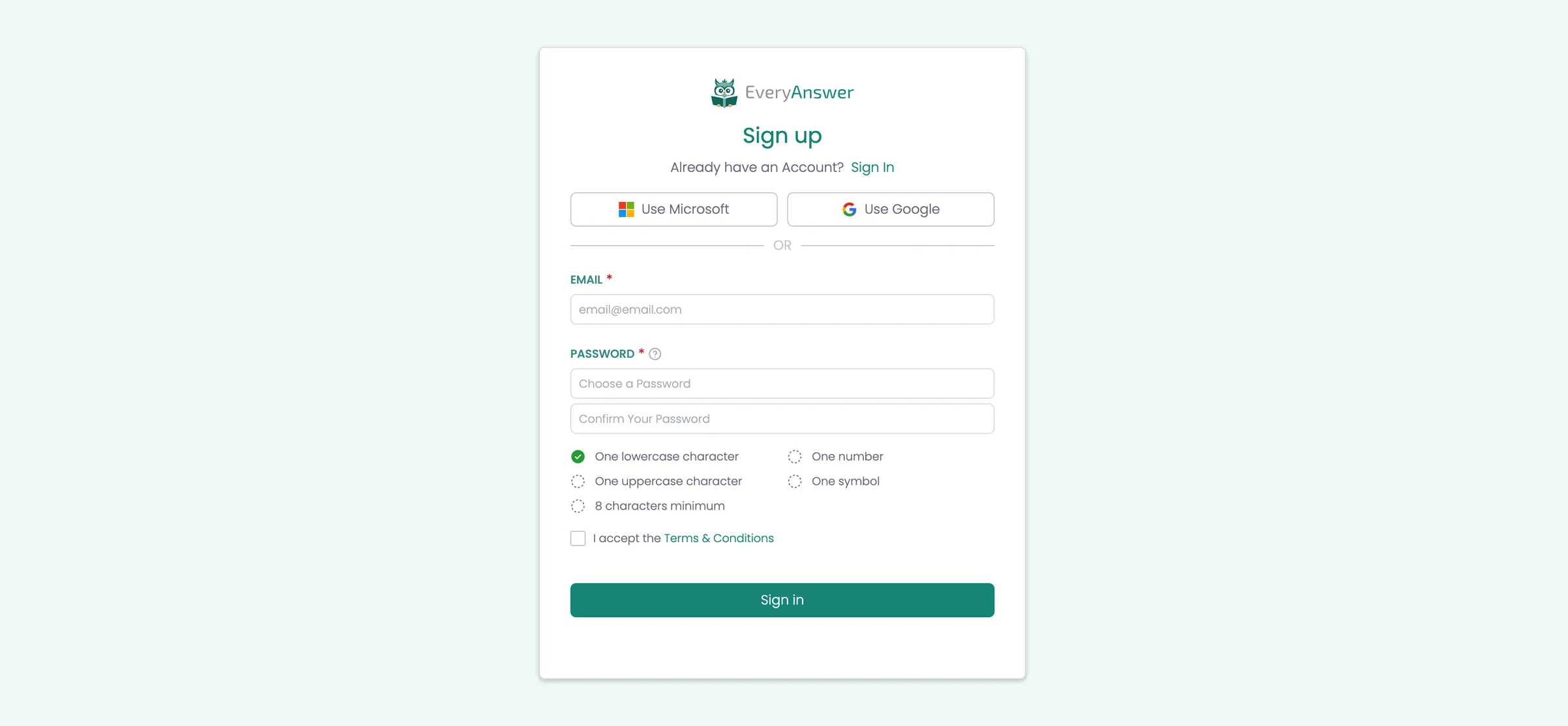
Typical sign-up process. User visits sign-up page, enters their email and password and is granted access. User is then logged in, but faced with a modal to provide their name and and a name for the workspace.
Step 1 - Email & Password
HTML
<body>
<div class="auth-page-wrapper">
<div class="modal-container">
<div class="modal-logo-container"><img loading="lazy" src="{app logo}" alt="{app name}"></div>
<div class="modal-heading-container">
<h1 class="modal-h1">Sign up</h1>
<div>Already have an Account? <a href="#">Sign In</a>
</div>
</div>
<!-- START SSO Button Area (for future) -->
<div class="sso-container">
<div class="w-layout-grid sso-button-grid">
<a href="#" class="button tertiary w-inline-block">
<div class="button-icon w-embed"><svg width="32" height="32" xmlns="http://www.w3.org/2000/svg" viewbox="0 0 21 21">
<path fill="#f35325" d="M0 0h10v10H0z"></path>
<path fill="#81bc06" d="M11 0h10v10H11z"></path>
<path fill="#05a6f0" d="M0 11h10v10H0z"></path>
<path fill="#ffba08" d="M11 11h10v10H11z"></path>
</svg></div>
<div>Use Microsoft</div>
</a>
<a href="#" class="button tertiary w-inline-block">
<div class="button-icon w-embed"><svg xmlns="http://www.w3.org/2000/svg" height="24" viewbox="0 0 24 24" width="24">
<path d="M22.56 12.25c0-.78-.07-1.53-.2-2.25H12v4.26h5.92c-.26 1.37-1.04 2.53-2.21 3.31v2.77h3.57c2.08-1.92 3.28-4.74 3.28-8.09z" fill="#4285F4"></path>
<path d="M12 23c2.97 0 5.46-.98 7.28-2.66l-3.57-2.77c-.98.66-2.23 1.06-3.71 1.06-2.86 0-5.29-1.93-6.16-4.53H2.18v2.84C3.99 20.53 7.7 23 12 23z" fill="#34A853"></path>
<path d="M5.84 14.09c-.22-.66-.35-1.36-.35-2.09s.13-1.43.35-2.09V7.07H2.18C1.43 8.55 1 10.22 1 12s.43 3.45 1.18 4.93l2.85-2.22.81-.62z" fill="#FBBC05"></path>
<path d="M12 5.38c1.62 0 3.06.56 4.21 1.64l3.15-3.15C17.45 2.09 14.97 1 12 1 7.7 1 3.99 3.47 2.18 7.07l3.66 2.84c.87-2.6 3.3-4.53 6.16-4.53z" fill="#EA4335"></path>
<path d="M1 1h22v22H1z" fill="none"></path>
</svg></div>
<div>Use Google</div>
</a>
</div>
<div class="separator">
<div class="separator-line"></div>
<div>or</div>
<div class="separator-line"></div>
</div>
</div>
<!-- END SSO Button Area -->
<div class="auth-form">
<form name="Sign-up" data-name="Sign-up" method="post" class="form">
<div class="form-field-container">
<div class="field-label-container">
<label for="First-Name" class="field-label">Your Name</label>
<div class="required-star">*</div>
</div>
<input class="form-field w-input" maxlength="256" name="First-Name" data-name="First Name" placeholder="First name " type="text" id="First-Name" required="">
<input class="form-field w-input" maxlength="256" name="Last-Name" data-name="Last Name" placeholder="Last name" type="text" id="Last-Name" required="">
</div>
<div class="form-field-container">
<div class="field-label-container"><label for="Password" class="field-label">Password</label>
<div class="required-star">*</div>
<div data-placement="right" data-tippy-content="Your password must meet the following requirements: at least 8 characters in length, contain at least one uppercase letter (A-Z), contain at least one lowercase letter (a-z), include at least one number (0-9), and include at least one special symbol (e.g., !, @, #, $)." class="help-tooltip w-embed">
<svg xmlns="http://www.w3.org/2000/svg" width="24" height="24" viewbox="0 0 24 24" fill="none" stroke="currentColor" stroke-width="2" stroke-linecap="round" stroke-linejoin="round">
<circle cx="12" cy="12" r="10"></circle>
<path d="M9.09 9a3 3 0 0 1 5.83 1c0 2-3 3-3 3"></path>
<line x1="12" y1="17" x2="12.01" y2="17"></line>
</svg>
</div>
</div>
<input class="form-field w-input" maxlength="256" name="Password" placeholder="Choose a Password" type="password" required="">
<input class="form-field w-input" maxlength="256" name="Confirm-Password" placeholder="Confirm Your Password" type="password" required="">
</div>
<div class="w-layout-grid grid-2---10px">
<div class="password-verification">
<div class="password-verification-option">
<div class="password-verification-icon verified w-embed">
<!-- START SVG for when password requirement NOT MET -->
<svg fill="currentColor" xmlns="http://www.w3.org/2000/svg" width="32" height="32" viewbox="0 0 32 32">
<path d="M16,2A14,14,0,1,0,30,16,14,14,0,0,0,16,2ZM14,21.5908l-5-5L10.5906,15,14,18.4092,21.41,11l1.5957,1.5859Z"></path>
<polygon id="inner-path" fill="none" points="14 21.591 9 16.591 10.591 15 14 18.409 21.41 11 23.005 12.585 14 21.591">
</polygon></svg>
<!-- END SVG for when password requirement IS met -->
</div>
</div>
<div>One lowercase character</div>
</div>
<div class="password-verification">
<div class="password-verification-option">
<div class="password-verification-icon w-embed">
<!-- START SVG for when password requirement is NOT MET -->
<svg fill="currentColor" width="32" height="32" xmlns="http://www.w3.org/2000/svg" viewbox="0 0 32 32">
<path d="M7.7,4.7a14.7,14.7,0,0,0-3,3.1L6.3,9A13.26,13.26,0,0,1,8.9,6.3Z"></path>
<path d="M4.6,12.3l-1.9-.6A12.51,12.51,0,0,0,2,16H4A11.48,11.48,0,0,1,4.6,12.3Z"></path>
<path d="M2.7,20.4a14.4,14.4,0,0,0,2,3.9l1.6-1.2a12.89,12.89,0,0,1-1.7-3.3Z"></path>
<path d="M7.8,27.3a14.4,14.4,0,0,0,3.9,2l.6-1.9A12.89,12.89,0,0,1,9,25.7Z"></path>
<path d="M11.7,2.7l.6,1.9A11.48,11.48,0,0,1,16,4V2A12.51,12.51,0,0,0,11.7,2.7Z"></path>
<path d="M24.2,27.3a15.18,15.18,0,0,0,3.1-3.1L25.7,23A11.53,11.53,0,0,1,23,25.7Z"></path>
<path d="M27.4,19.7l1.9.6A15.47,15.47,0,0,0,30,16H28A11.48,11.48,0,0,1,27.4,19.7Z"></path>
<path d="M29.2,11.6a14.4,14.4,0,0,0-2-3.9L25.6,8.9a12.89,12.89,0,0,1,1.7,3.3Z"></path>
<path d="M24.1,4.6a14.4,14.4,0,0,0-3.9-2l-.6,1.9a12.89,12.89,0,0,1,3.3,1.7Z"></path>
<path d="M20.3,29.3l-.6-1.9A11.48,11.48,0,0,1,16,28v2A21.42,21.42,0,0,0,20.3,29.3Z"></path>
</svg>
<!-- END SVG for when password requirement is NOT MET -->
</div>
</div>
<div>One number</div>
</div>
<div class="password-verification">
<div class="password-verification-option">
<div class="password-verification-icon w-embed">
<!-- START SVG for when password requirement is NOT MET -->
<svg fill="currentColor" width="32" height="32" xmlns="http://www.w3.org/2000/svg" viewbox="0 0 32 32">
<path d="M7.7,4.7a14.7,14.7,0,0,0-3,3.1L6.3,9A13.26,13.26,0,0,1,8.9,6.3Z"></path>
<path d="M4.6,12.3l-1.9-.6A12.51,12.51,0,0,0,2,16H4A11.48,11.48,0,0,1,4.6,12.3Z"></path>
<path d="M2.7,20.4a14.4,14.4,0,0,0,2,3.9l1.6-1.2a12.89,12.89,0,0,1-1.7-3.3Z"></path>
<path d="M7.8,27.3a14.4,14.4,0,0,0,3.9,2l.6-1.9A12.89,12.89,0,0,1,9,25.7Z"></path>
<path d="M11.7,2.7l.6,1.9A11.48,11.48,0,0,1,16,4V2A12.51,12.51,0,0,0,11.7,2.7Z"></path>
<path d="M24.2,27.3a15.18,15.18,0,0,0,3.1-3.1L25.7,23A11.53,11.53,0,0,1,23,25.7Z"></path>
<path d="M27.4,19.7l1.9.6A15.47,15.47,0,0,0,30,16H28A11.48,11.48,0,0,1,27.4,19.7Z"></path>
<path d="M29.2,11.6a14.4,14.4,0,0,0-2-3.9L25.6,8.9a12.89,12.89,0,0,1,1.7,3.3Z"></path>
<path d="M24.1,4.6a14.4,14.4,0,0,0-3.9-2l-.6,1.9a12.89,12.89,0,0,1,3.3,1.7Z"></path>
<path d="M20.3,29.3l-.6-1.9A11.48,11.48,0,0,1,16,28v2A21.42,21.42,0,0,0,20.3,29.3Z"></path>
</svg>
<!-- END SVG for when password requirement is NOT MET -->
</div>
</div>
<div>One uppercase character</div>
</div>
<div class="password-verification">
<div class="password-verification-option">
<div class="password-verification-icon w-embed">
<!-- START SVG for when password requirement is NOT MET -->
<svg fill="currentColor" width="32" height="32" xmlns="http://www.w3.org/2000/svg" viewbox="0 0 32 32">
<path d="M7.7,4.7a14.7,14.7,0,0,0-3,3.1L6.3,9A13.26,13.26,0,0,1,8.9,6.3Z"></path>
<path d="M4.6,12.3l-1.9-.6A12.51,12.51,0,0,0,2,16H4A11.48,11.48,0,0,1,4.6,12.3Z"></path>
<path d="M2.7,20.4a14.4,14.4,0,0,0,2,3.9l1.6-1.2a12.89,12.89,0,0,1-1.7-3.3Z"></path>
<path d="M7.8,27.3a14.4,14.4,0,0,0,3.9,2l.6-1.9A12.89,12.89,0,0,1,9,25.7Z"></path>
<path d="M11.7,2.7l.6,1.9A11.48,11.48,0,0,1,16,4V2A12.51,12.51,0,0,0,11.7,2.7Z"></path>
<path d="M24.2,27.3a15.18,15.18,0,0,0,3.1-3.1L25.7,23A11.53,11.53,0,0,1,23,25.7Z"></path>
<path d="M27.4,19.7l1.9.6A15.47,15.47,0,0,0,30,16H28A11.48,11.48,0,0,1,27.4,19.7Z"></path>
<path d="M29.2,11.6a14.4,14.4,0,0,0-2-3.9L25.6,8.9a12.89,12.89,0,0,1,1.7,3.3Z"></path>
<path d="M24.1,4.6a14.4,14.4,0,0,0-3.9-2l-.6,1.9a12.89,12.89,0,0,1,3.3,1.7Z"></path>
<path d="M20.3,29.3l-.6-1.9A11.48,11.48,0,0,1,16,28v2A21.42,21.42,0,0,0,20.3,29.3Z"></path>
</svg>
<!-- END SVG for when password requirement is NOT MET -->
</div>
</div>
<div>One symbol</div>
</div>
<div class="password-verification">
<div class="password-verification-option">
<div class="password-verification-icon w-embed">
<!-- START SVG for when password requirement is NOT MET -->
<svg fill="currentColor" width="32" height="32" xmlns="http://www.w3.org/2000/svg" viewbox="0 0 32 32">
<path d="M7.7,4.7a14.7,14.7,0,0,0-3,3.1L6.3,9A13.26,13.26,0,0,1,8.9,6.3Z"></path>
<path d="M4.6,12.3l-1.9-.6A12.51,12.51,0,0,0,2,16H4A11.48,11.48,0,0,1,4.6,12.3Z"></path>
<path d="M2.7,20.4a14.4,14.4,0,0,0,2,3.9l1.6-1.2a12.89,12.89,0,0,1-1.7-3.3Z"></path>
<path d="M7.8,27.3a14.4,14.4,0,0,0,3.9,2l.6-1.9A12.89,12.89,0,0,1,9,25.7Z"></path>
<path d="M11.7,2.7l.6,1.9A11.48,11.48,0,0,1,16,4V2A12.51,12.51,0,0,0,11.7,2.7Z"></path>
<path d="M24.2,27.3a15.18,15.18,0,0,0,3.1-3.1L25.7,23A11.53,11.53,0,0,1,23,25.7Z"></path>
<path d="M27.4,19.7l1.9.6A15.47,15.47,0,0,0,30,16H28A11.48,11.48,0,0,1,27.4,19.7Z"></path>
<path d="M29.2,11.6a14.4,14.4,0,0,0-2-3.9L25.6,8.9a12.89,12.89,0,0,1,1.7,3.3Z"></path>
<path d="M24.1,4.6a14.4,14.4,0,0,0-3.9-2l-.6,1.9a12.89,12.89,0,0,1,3.3,1.7Z"></path>
<path d="M20.3,29.3l-.6-1.9A11.48,11.48,0,0,1,16,28v2A21.42,21.42,0,0,0,20.3,29.3Z"></path>
</svg>
<!-- END SVG for when password requirement is NOT MET -->
</div>
</div>
<div>8 characters minimum</div>
</div>
</div>
<div class="form-field-container">
<label class="w-checkbox checkbox-field">
<div class="w-checkbox-input w-checkbox-input--inputType-custom checkbox"></div>
<input type="checkbox" name="Accept-Terms" id="Accept-Terms" style="opacity:0;position:absolute;z-index:-1">
<span class="checkbox-label w-form-label" for="Accept-Terms">I accept the <a href="#">Terms & Conditions</a></span>
</label>
</div>
<div class="form-button-container">
<input type="submit" data-wait="Processing... Please wait" class="button full w-button" value="Sign in">
</div>
</form>
</div>
</div>
</div>
</body>Step 2 - Required Information
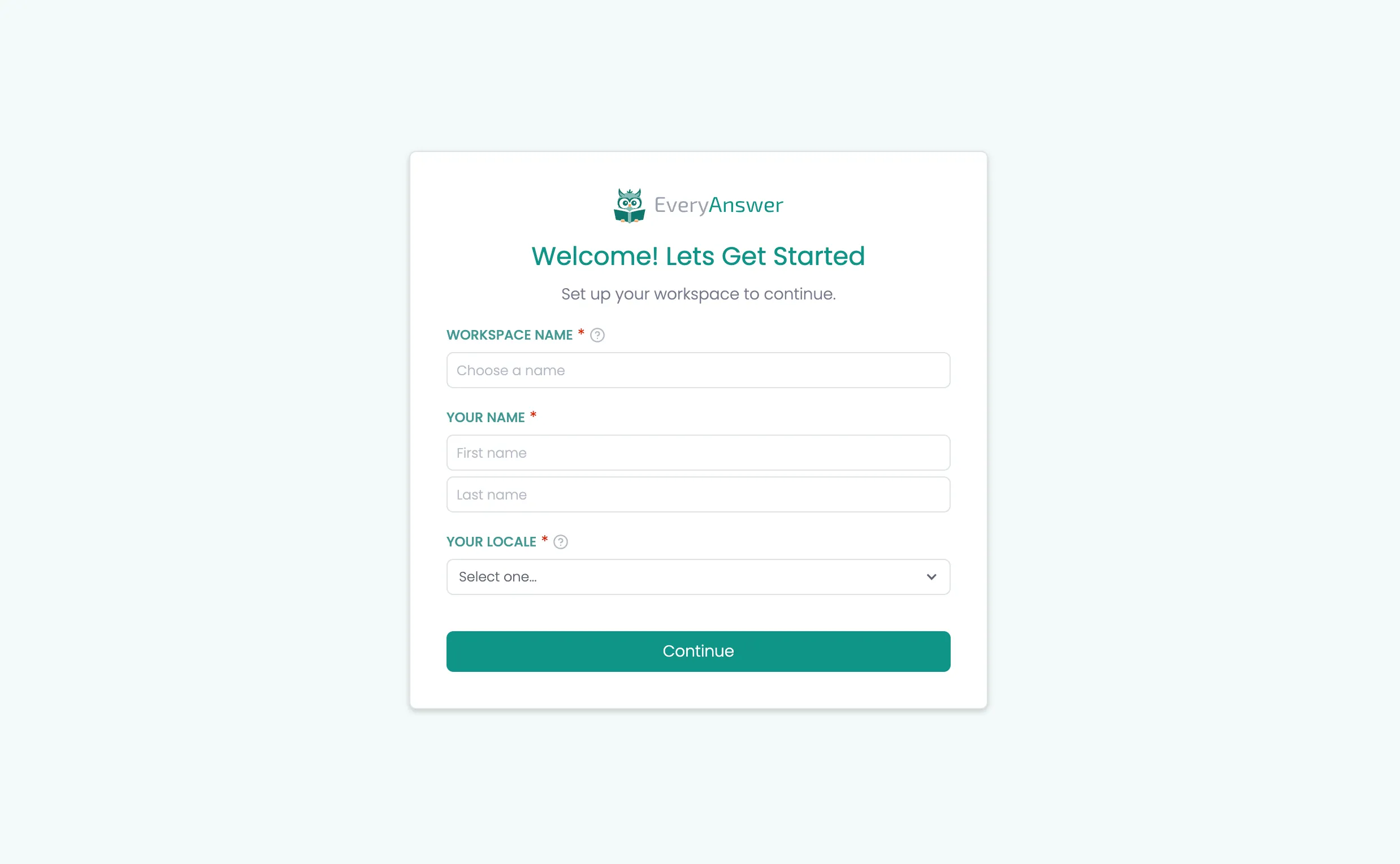
Description
Once step 1 is completed, they user is presented with Step 2 which has them complete required information to finish the essential setup of their account. (their name and workspace name)
HTML
<body>
    <div class="auth-page-wrapper">
        <div class="modal-container">
            <div class="modal-logo-container"><img loading="lazy" src="{app logo}" alt="{app name}"></div>
            <div class="modal-heading-container">
                <h1 class="modal-h1">Welcome! Lets Get Started</h1>
                <div>Set up your workspace to continue.</div>
            </div>
            <div class="auth-form">
                <form name="Sign-up" method="post" class="form" >
                    <div class="form-field-container">
                        <div class="field-label-container">
                            <label for="Workspace-Name" class="field-label">Workspace Name</label>
                            <div class="required-star">*</div>
                            <div data-placement="right" data-tippy-content="This is the name of your workspace, typically the name of your company or organization. The default is ‘My Workspace,’ but you can rename it to suit your needs." class="help-tooltip w-embed">
                                <svg xmlns="http://www.w3.org/2000/svg" width="24" height="24" viewbox="0 0 24 24" fill="none" stroke="currentColor" stroke-width="2" stroke-linecap="round" stroke-linejoin="round">
                                <circle cx="12" cy="12" r="10"></circle>
                                <path d="M9.09 9a3 3 0 0 1 5.83 1c0 2-3 3-3 3"></path>
                                <line x1="12" y1="17" x2="12.01" y2="17"></line>
                                </svg></div>
                        </div>
                        <input class="form-field w-input" maxlength="256" name="Workspace-Name" placeholder="Choose a name" type="text" value="My Workspace" required="">
                    </div>
                    <div class="form-field-container">
                        <div class="field-label-container"><label for="name" class="field-label">Your Name</label>
                            <div class="required-star">*</div>
                        </div><input class="form-field w-input" maxlength="256" name="First-Name-2" data-name="First Name 2" placeholder="First name " type="text" id="First-Name-2" required=""><input class="form-field w-input" maxlength="256" name="Last-Name-2" data-name="Last Name 2" placeholder="Last name" type="text" id="Last-Name-2" required="">
                    </div>
                    <div class="form-field-container">
                        <div class="field-label-container"><label for="name" class="field-label">Your Locale</label>
                            <div class="required-star">*</div>
                            <div data-placement="right" data-tippy-content="Select the country or region you’re signing up from. This helps customize your experience based on your location." class="help-tooltip w-embed"><svg xmlns="http://www.w3.org/2000/svg" width="24" height="24" viewbox="0 0 24 24" fill="none" stroke="currentColor" stroke-width="2" stroke-linecap="round" stroke-linejoin="round">
                                <circle cx="12" cy="12" r="10"></circle>
                                <path d="M9.09 9a3 3 0 0 1 5.83 1c0 2-3 3-3 3"></path>
                                <line x1="12" y1="17" x2="12.01" y2="17"></line>
                                </svg></div>
                        </div>
                        <div data-delay="0" data-hover="false" class="dropdown w-dropdown">
                            <div class="dropdown-closed w-dropdown-toggle">
                                <div class="dropdown-arrow w-icon-dropdown-toggle"></div>
                                <div class="dropdown-text">Select one...</div>
                            </div>
                            <div class="dropdown-open w-dropdown-list">
                                <div class="Dropdown-Filter">
                                    <input class="dropdown-filter-input w-input" maxlength="256" name="Dropdown-Filter" placeholder="Filter" type="text"></div>
                                <div class="dropdown-options">
                                    <a href="#" class="dropdown-option w-inline-block">
                                        <div class="dropdown-option-selected-icon-container">
                                            <div class="dropdown-option-selected-icon selected w-embed"><svg xmlns="http://www.w3.org/2000/svg" width="24" height="24" viewbox="0 0 24 24" fill="none" stroke="currentColor" stroke-width="4" stroke-linecap="round" stroke-linejoin="round">
                                                <polyline points="20 6 9 17 4 12"></polyline>
                                                </svg></div>
                                        </div>
                                        <div class="dropdown-option-text">United States</div>
                                    </a>
                                    <a href="#" class="dropdown-option w-inline-block">
                                        <div class="dropdown-option-selected-icon-container">
                                            <div class="dropdown-option-selected-icon selected w-embed"><svg xmlns="http://www.w3.org/2000/svg" width="24" height="24" viewbox="0 0 24 24" fill="none" stroke="currentColor" stroke-width="4" stroke-linecap="round" stroke-linejoin="round">
                                                <polyline points="20 6 9 17 4 12"></polyline>
                                                </svg></div>
                                        </div>
                                        <div class="dropdown-option-text">Canada</div>
                                    </a>

                                </div>
                            </div>
                        </div>
                    </div>
                    <div class="form-button-container"><input type="submit" class="button full w-button" value="Finish Setup" data-wait="Processing... Please wait."></div>
                </form>
            </div>
        </div>
    </div>
</body>
Invited Users
Description
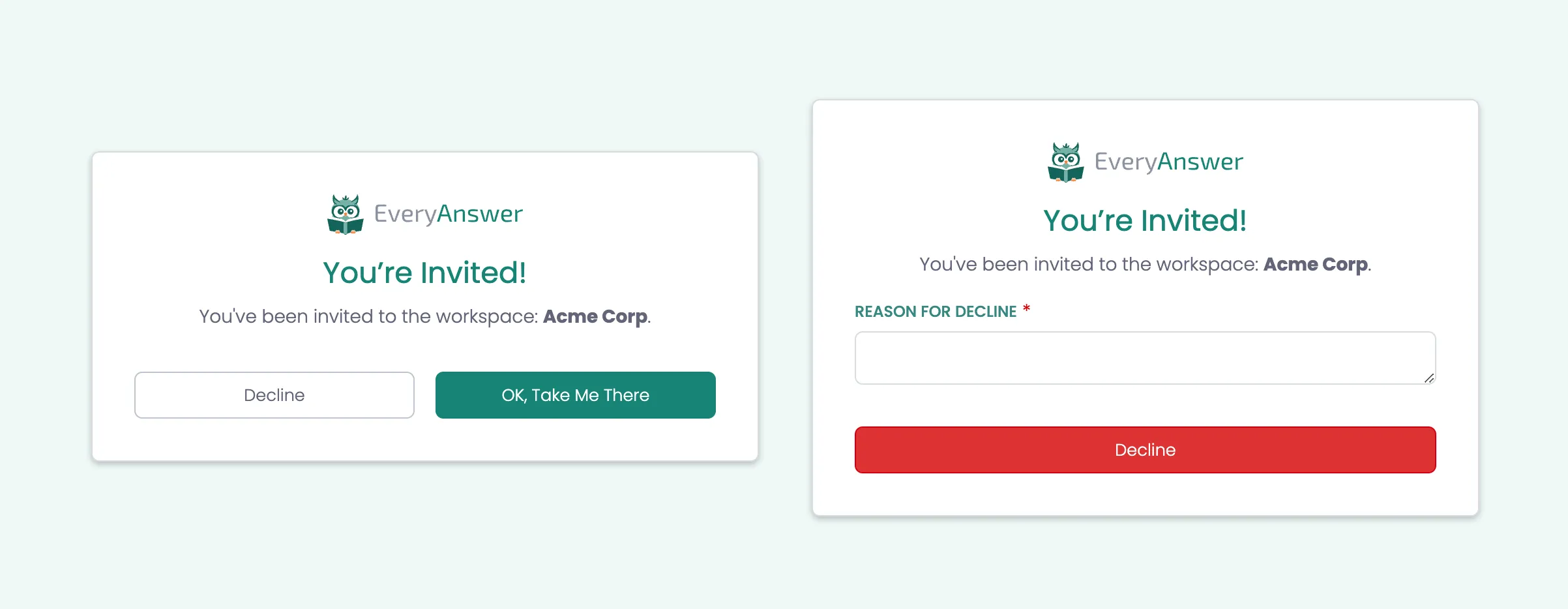
When a user is invited they are sent an email. When they click the link in the email are taken to the appand shown the You're Invited screen. If they click "OK, Take Me There" they are added to the workspace. If they click delicine they are prompted for a reason and not added to the workspace.
Join Workspace - Existing User
Because they already have an account no further info is required. Simply add them to the Workspace and forward them to the app in the new workspace.
Join Workspace - New User
If they don't have an account, once they click "OK, Take Me There", take them to the sign-up screen to create an account. This should be the Method 2 / Basic sign-up screen. Also because we know their email address, it should be prefilled on the sign-up screen.
Decline Joining a Workspace
If the user clicks the "Decline" button they will be presented with a decline form. This will ask them to enter a reason for declining their invitation. Once the reason is provided and form submitted, their invitation will be marked as declined and the reason stored for admins to review. If a user declines they are not be added to the workspace.
HTML
<!-- Auth Page Wrapper -->
<div class="auth-page-wrapper">
  <div class="modal-container">
    <!-- Logo Section -->
    <div class="modal-logo-container">
      <img
        loading="lazy"
        src="https://cdn.prod.website-files.com/665515d66ae3ac9e19b76d10/665655e8425d85b1365b8255_everyanswer-logo%2Bworkmark-light.svg"
        alt="EveryAnswer Logo"
      >
    </div>

    <!-- Heading Section -->
    <div class="modal-heading-container">
      <h1 class="modal-h1">You’re Invited!</h1>
      <div>
        You've been invited to the workspace: <strong>Acme Corp</strong>.
      </div>
    </div>

    <!-- Action Buttons -->
    <div id="action-buttons" class="button-container">
      <button
        type="button"
        class="button tertiary"
        data-wait="Processing... Please wait"
        onclick="showDeclineForm();"
      >Decline</button>
      <button
        type="button"
        class="button primary"
        data-wait="Processing... Please wait"
        onclick="location.href='your-next-page-url';"
      >OK, Take Me There</button>
    </div>

    <!-- Decline Form: Initially Hidden -->
    <div id="decline-form-container" style="display:none;">
      <form
        id="decline-form"
        name="decline-form"
        method="get"
        class="form"
        aria-label="Decline Form"
      >
        <div class="form-field-container">
          <div class="field-label-container">
            <label for="declineReason" class="field-label">Reason for Decline</label>
            <div class="required-star">*</div>
          </div>
          <textarea
            id="declineReason"
            name="declineReason"
            maxlength="5000"
            placeholder="Enter a reason..."
            required
            class="form-field"
          ></textarea>
        </div>
        <div class="button-container">
          <button
            type="submit"
            data-wait="Submitting... Please wait"
            class="button danger"
          >Submit</button>
        </div>
      </form>
    </div>
  </div>
</div>

<!-- JavaScript to Show Decline Form and Hide Action Buttons -->
<script>
  function showDeclineForm() {
    document.getElementById('action-buttons').style.display = 'none';
    document.getElementById('decline-form-container').style.display = 'block';
  }
</script>