2FA Modals - Done
Overview
This documentation outlines the implementation of Two-Factor Authentication (2FA) modals used within our application. The modals support both Authenticator App and SMS-based 2FA methods, allowing users to secure their accounts effectively. This guide covers the HTML structure, dependencies, CSS styles, and JavaScript functionalities required for integrating these modals into your project.
2FA Authentication Modal(s)
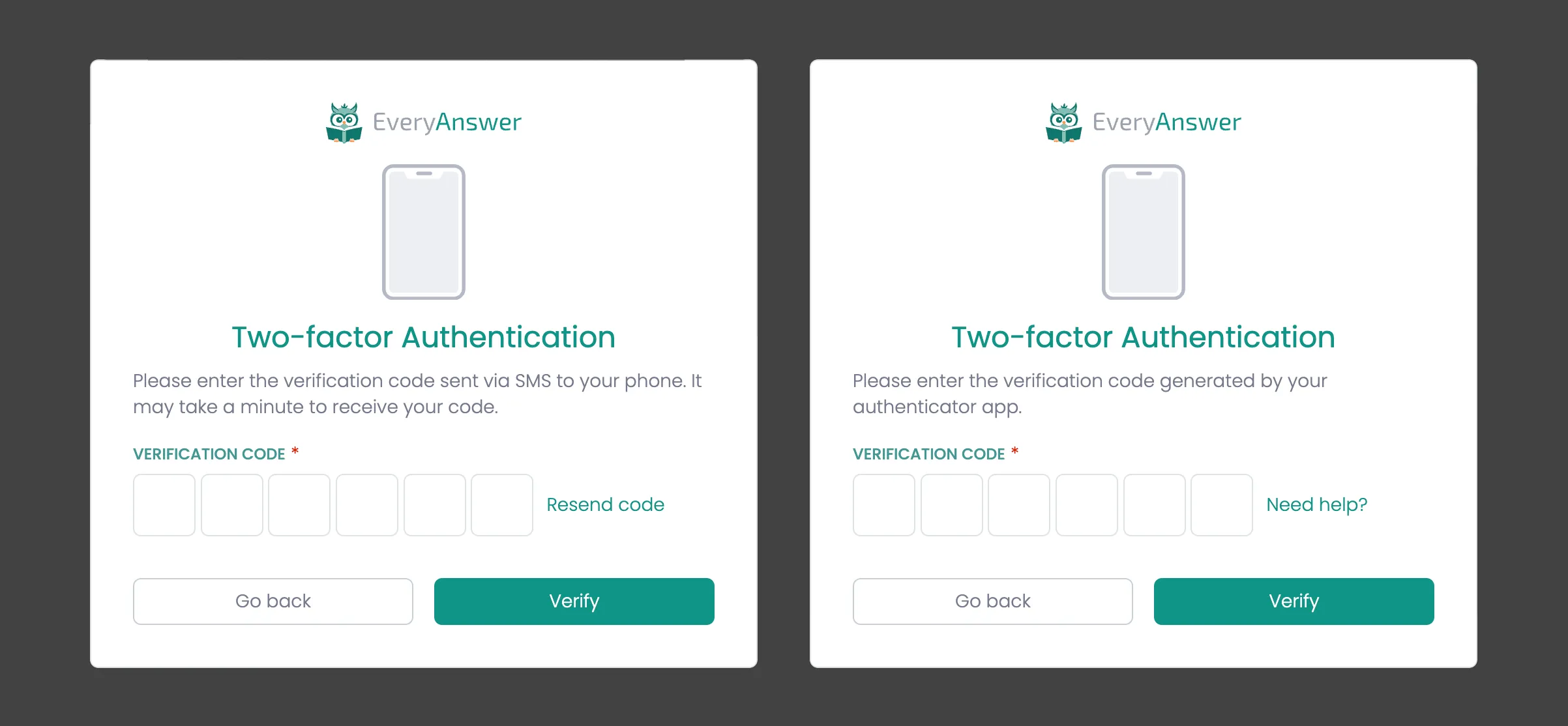
Description
Same page used for both with minor tweaks depending if 2FA is using and authenticator or SMS (see notes in HTML).
Dependencies
- Requires 2fa-input.js
HTML
<div class="modal-background">
    <div class="modal-container">
        <div class="modal-logo-container">
            <img loading="lazy" src="{app logo}" alt="{app name}">
        </div>
        <div class="modal-heading-container">
            <div class="w-embed">
                <svg width="4rem" height="auto" viewBox="0 0 368 600" fill="none" xmlns="http://www.w3.org/2000/svg">
                    <path d="M51.3987 32.5698C46.0433 32.5698 40.8237 34.4555 37.1353 38.1364C33.4393 41.8022 31.5536 47.0596 31.5536 52.3999V547.6C31.5536 552.94 33.4393 558.16 37.1353 561.856C40.8237 565.552 46.0433 567.438 51.3987 567.438H316.302C321.642 567.438 326.907 565.552 330.558 561.856C334.262 558.16 336.14 552.94 336.14 547.6V52.3999C336.14 47.0596 334.254 41.8022 330.558 38.1364C326.907 34.448 321.642 32.5698 316.302 32.5698H275.405C272.184 32.5698 269.318 34.4932 268.104 37.4727L262.009 52.3999C260.04 57.2801 258.479 59.6711 255.99 61.2853C253.561 62.9372 249.239 64.31 240.753 64.31H126.932C118.454 64.31 114.132 62.9296 111.696 61.2853C109.222 59.6787 107.645 57.2876 105.684 52.3999L99.5973 37.4727C98.4055 34.5234 95.5392 32.5698 92.3637 32.5698H51.3987Z" fill="var(--brand-colors--gray-100)"></path>
                    <path d="M50.2049 15.6362H317.477C336.771 15.6362 352 30.9481 352 50.2049V549.795C352 569.044 336.764 584.371 317.477 584.371H50.2049C30.9255 584.371 15.6739 569.044 15.6739 549.795V50.2049C15.6815 30.9557 30.9255 15.6362 50.2049 15.6362V15.6362ZM50.2049 0C22.5228 0 0 22.5228 0 50.2049V549.795C0 577.492 22.5228 600 50.2049 600H317.477C345.174 600 367.719 577.492 367.719 549.795V50.2049C367.719 22.5228 345.174 0 317.477 0H50.2049Z" fill="var(--brand-colors--gray-400)"></path>
                    <path d="M158.564 32.5698C154.197 32.5698 150.712 36.0546 150.712 40.4219C150.712 44.7816 154.197 48.2815 158.564 48.2815H213.091C217.413 48.2815 220.95 44.7816 220.95 40.4219C220.95 36.0546 217.413 32.5698 213.091 32.5698H158.564Z" fill="var(--brand-colors--gray-400)"></path>
                </svg>
            </div>
            <h1 class="modal-h1">Two-factor Authentication</h1>
            <!-- IF Authenticator --> <div>Please enter the verification code generated by your authenticator app.</div>
            <!-- ELSEIF SMS --> <div>Please enter the verification code sent via SMS to your phone. It may take a minute to receive your code.</div>
        </div>
        <div class="auth-form w-form">
            <form name="2fa" data-name="Sign-up" method="get" class="form" aria-label="Sign-up">
                <div class="form-field-container">
                    <div class="field-label-container">
                        <label for="name" class="field-label">Verification Code</label>
                        <div class="required-star">*</div>
                    </div>
                    <div class="_2fa-code-container">
                        <div class="_2fa-code w-embed w-script">
                            <input type="text" style="outline: none;" maxlength="1" class="form-field code" inputmode="numeric" autocomplete="one-time-code" autofocus="">
                            <input type="text" style="outline: none;" maxlength="1" class="form-field code" inputmode="numeric" autocomplete="one-time-code">
                            <input type="text" style="outline: none;" maxlength="1" class="form-field code" inputmode="numeric" autocomplete="one-time-code">
                            <input type="text" style="outline: none;" maxlength="1" class="form-field code" inputmode="numeric" autocomplete="one-time-code">
                            <input type="text" style="outline: none;" maxlength="1" class="form-field code" inputmode="numeric" autocomplete="one-time-code">
                            <input type="text" style="outline: none;" maxlength="1" class="form-field code" inputmode="numeric" autocomplete="one-time-code">
                        </div>
                        <!-- IF Authenticator --> <a href="link to help document">Need help?</a>
                        <!-- ELSEIF SMS --> <a href="{triggers code resend}">Resend code</a>
                    </div>
                </div>
                <div class="form-button-container">
                    <input type="button" data-wait="Please wait..." class="button tertiary full w-button" value="Go back">
                    <input type="submit" data-wait="Verifying... Please wait" class="button full w-button" value="Verify">
                </div>
            </form>
        </div>
    </div>
</div>
2FA SMS Setup
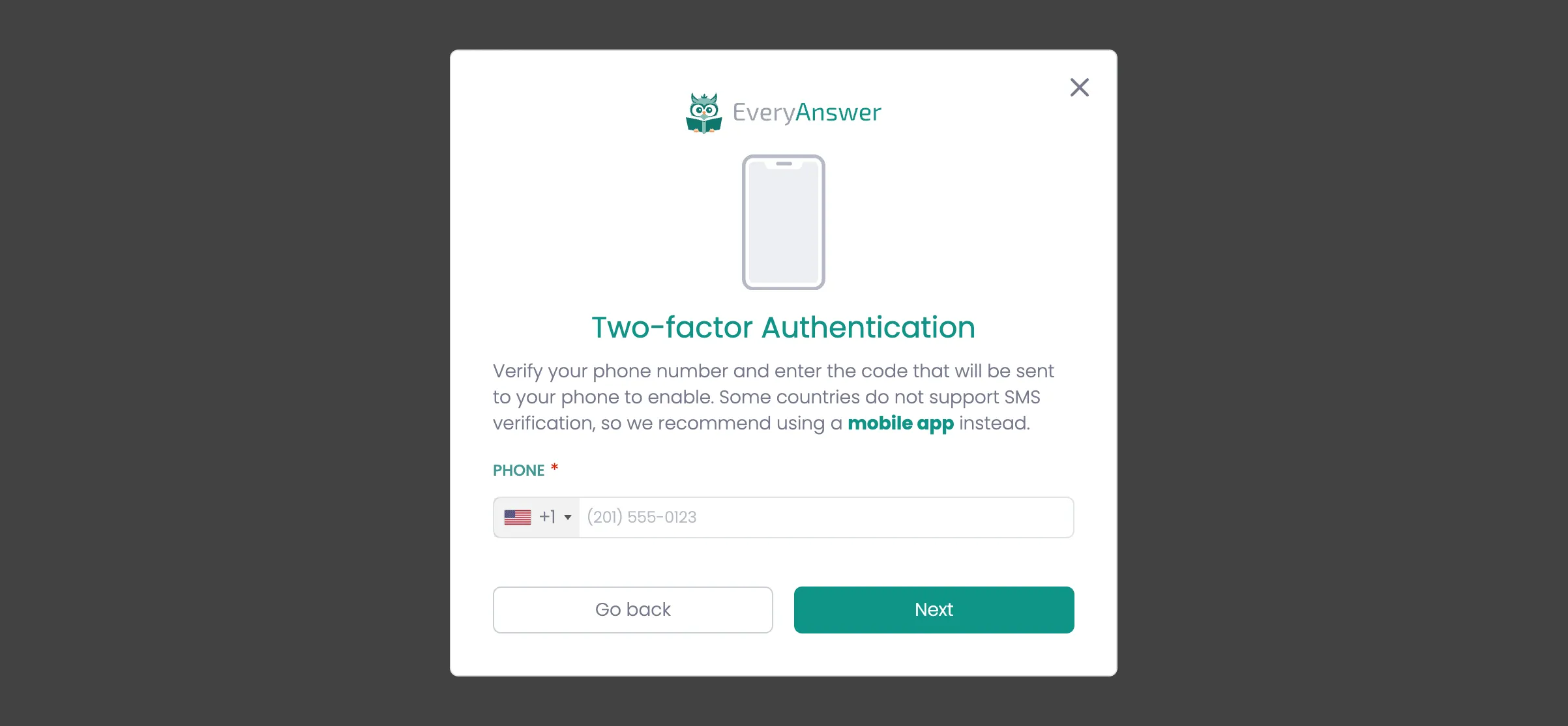
Description
If the user has a verified phone number tied to their account, they can set up SMS-based two-factor authentication (2FA). This process enhances account security by requiring a verification code sent via SMS during login.
Depedencies
Module | Global Depenedency | Description |
|---|---|---|
intl-tel-input | Yes | Library for formating and validation |
phone-input.js | Yes | Handles phone input styling, formatting, and validation using intl-tel-input. Works with our custom classes and colors. |
HTML
<div class="modal-background">
    <div class="modal-container">
        <div class="modal-logo-container">
            <img loading="lazy" src="{app logo}" alt="{app name}">
        </div>
        <div class="modal-heading-container">
            <div class="w-embed">
                <svg width="4rem" height="auto" viewBox="0 0 368 600" fill="none" xmlns="http://www.w3.org/2000/svg">
                    <path d="M51.3987 32.5698C46.0433 32.5698 40.8237 34.4555 37.1353 38.1364C33.4393 41.8022 31.5536 47.0596 31.5536 52.3999V547.6C31.5536 552.94 33.4393 558.16 37.1353 561.856C40.8237 565.552 46.0433 567.438 51.3987 567.438H316.302C321.642 567.438 326.907 565.552 330.558 561.856C334.262 558.16 336.14 552.94 336.14 547.6V52.3999C336.14 47.0596 334.254 41.8022 330.558 38.1364C326.907 34.448 321.642 32.5698 316.302 32.5698H275.405C272.184 32.5698 269.318 34.4932 268.104 37.4727L262.009 52.3999C260.04 57.2801 258.479 59.6711 255.99 61.2853C253.561 62.9372 249.239 64.31 240.753 64.31H126.932C118.454 64.31 114.132 62.9296 111.696 61.2853C109.222 59.6787 107.645 57.2876 105.684 52.3999L99.5973 37.4727C98.4055 34.5234 95.5392 32.5698 92.3637 32.5698H51.3987Z" fill="var(--brand-colors--gray-100)"></path>
                    <path d="M50.2049 15.6362H317.477C336.771 15.6362 352 30.9481 352 50.2049V549.795C352 569.044 336.764 584.371 317.477 584.371H50.2049C30.9255 584.371 15.6739 569.044 15.6739 549.795V50.2049C15.6815 30.9557 30.9255 15.6362 50.2049 15.6362V15.6362ZM50.2049 0C22.5228 0 0 22.5228 0 50.2049V549.795C0 577.492 22.5228 600 50.2049 600H317.477C345.174 600 367.719 577.492 367.719 549.795V50.2049C367.719 22.5228 345.174 0 317.477 0H50.2049Z" fill="var(--brand-colors--gray-400)"></path>
                    <path d="M158.564 32.5698C154.197 32.5698 150.712 36.0546 150.712 40.4219C150.712 44.7816 154.197 48.2815 158.564 48.2815H213.091C217.413 48.2815 220.95 44.7816 220.95 40.4219C220.95 36.0546 217.413 32.5698 213.091 32.5698H158.564Z" fill="var(--brand-colors--gray-400)"></path>
                </svg>
            </div>
            <h1 class="modal-h1">Two-factor Authentication</h1>
            <div>Verify your phone number and enter the code that will be sent to your phone to enable. Some countries do not support SMS verification, so we recommend using a <a href="#"><strong>mobile app</strong></a> instead.</div>
        </div>
        <div class="auth-form w-form">
            <form id="wf-form-Sign-up" name="wf-form-Sign-up" data-name="Sign-up" method="get" class="form" data-wf-page-id="6781b4cd45211f6083eee342" data-wf-element-id="53e03f34-bc65-62a6-22f6-274f68cf2ea9" aria-label="Sign-up">
                <div class="form-field-container">
                    <div class="form-field-container">
                        <div class="field-label-container">
                            <label for="name" class="field-label">Phone</label>
                            <div class="required-star">*</div>
                        </div>
                        <div class="phone-input w-embed">
                            <input style="width: 100% !important; outline: none;" type="tel" class="form-field" placeholder="(201) 555-0123" required>
                        </div>
                    </div>
                </div>
                <div class="form-button-container">
                    <input type="button" class="button tertiary w-button" value="Go back">
                    <input type="submit" class="button w-button" value="Next" data-wait="Processing... Please wait">
                </div>
            </form>
        </div><
        div class="modal-close-button w-embed">
            <svg xmlns="http://www.w3.org/2000/svg" width="256" height="256" viewBox="0 0 24 24" fill="none" stroke="currentColor" stroke-width="2" stroke-linecap="round" stroke-linejoin="round"><line x1="18" y1="6" x2="6" y2="18"></line><line x1="6" y1="6" x2="18" y2="18"></line></svg>
        </div>
    </div>
</div>
Script
- Requires phone-input.js
2FA Authenticator Setup
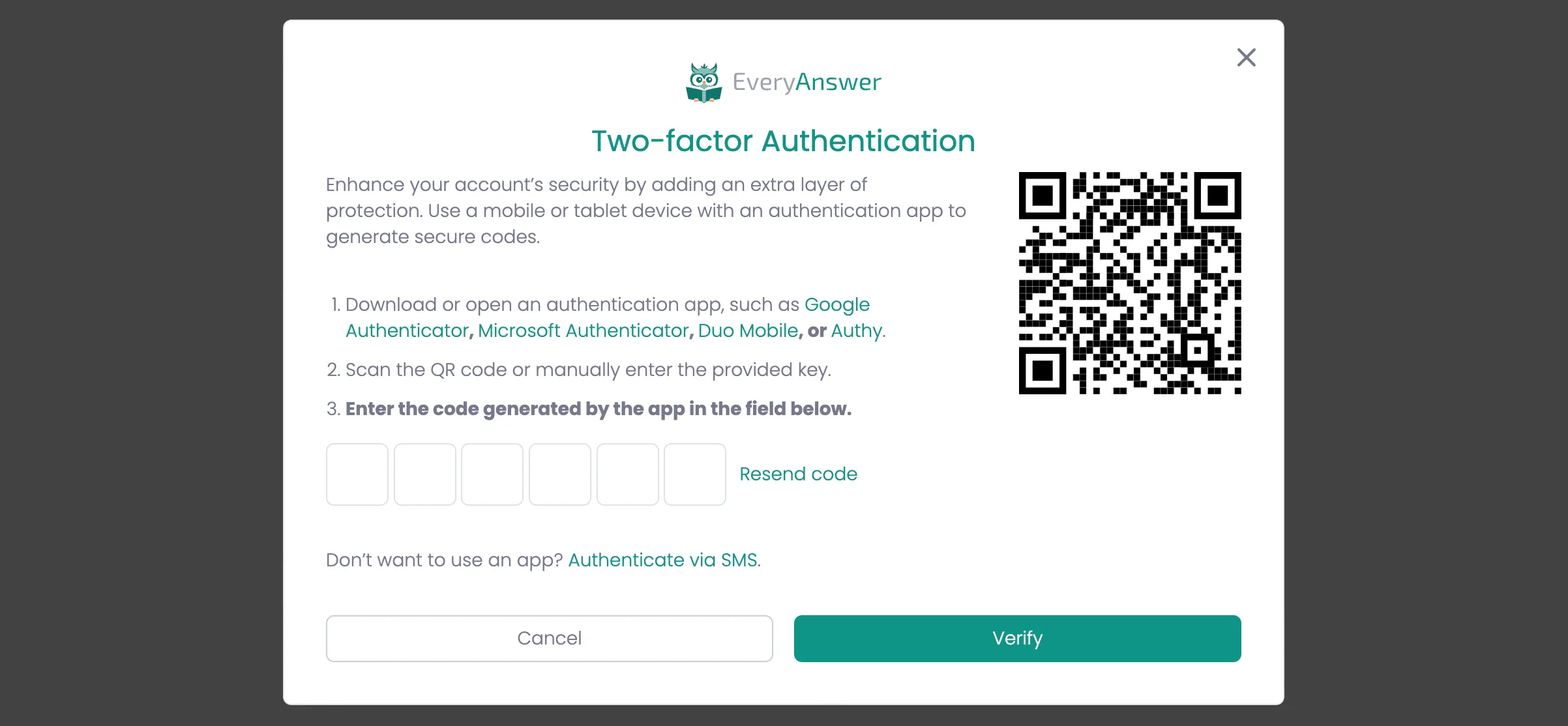
Description
The 2FA setup enhances account security by requiring a time-sensitive code generated by an authenticator app (e.g., Google Authenticator, Microsoft Authenticator, Duo Mobile, Authy). The user will scan a QR code or manually input a secret key and then enter the app-generated code for verification.
Depedencies
- Requires 2fa-input.js
HTML
<div class="modal-background">
    <div class="modal-container _48">
        <div class="modal-logo-container">
            <img loading="lazy" src="{app logo}" alt="{app name}">
        </div>
        <div class="modal-heading-container">
            <h1 class="modal-h1">Two-factor Authentication</h1>
            <div class="auth-form">
                <form name="2fa" method="get" class="form" aria-label="Authenticate">
                    <div class="w-layout-grid _2fa-auth-page-grid">
                        <div>
                            <div>
                                Enhance your account’s security by adding an extra layer of protection. Use a mobile or tablet device with an authentication app to generate secure codes.
                            </div>
                            <ul role="list" class="list">
                                <li>
                                    Download or open an authentication app, such as
                                    <a href="#">Google Authenticator</a>,
                                    <a href="#">Microsoft Authenticator</a>,
                                    <a href="#">Duo Mobile</a>, or
                                    <a href="#">Authy</a>.
                                </li>
                                <li>Scan the QR code or manually enter the provided key.</li>
                                <li><strong>Enter the code generated by the app in the field below.</strong></li>
                            </ul>
                            <div class="form-field-container">
                                <div class="_2fa-code-container">
                                    <div class="_2fa-code w-embed w-script">
                                        <input type="text" style="outline: none;" maxlength="1" class="form-field code" inputmode="numeric" autocomplete="one-time-code"  autofocus="">
                                        <input type="text" style="outline: none;" maxlength="1" class="form-field code" inputmode="numeric" autocomplete="one-time-code">
                                        <input type="text" style="outline: none;" maxlength="1" class="form-field code" inputmode="numeric" autocomplete="one-time-code">
                                        <input type="text" style="outline: none;" maxlength="1" class="form-field code" inputmode="numeric" autocomplete="one-time-code">
                                        <input type="text" style="outline: none;" maxlength="1" class="form-field code" inputmode="numeric" autocomplete="one-time-code">
                                        <input type="text" style="outline: none;" maxlength="1" class="form-field code" inputmode="numeric" autocomplete="one-time-code">
                                    </div>
                                </div>
                            </div>
                        </div>
                        <div class="qr-code-container">
                            <img width="Auto" alt="" src="QR CODE" loading="lazy" class="qr-code">
                        </div>
                    </div>
                    <div class="form-button-container">
                        <div>Don’t want to use an app? <a href="link to help document">Authenticate via SMS</a>.</div>
                    </div>
                    <div class="form-button-container">
                        <input type="button" class="button tertiary w-button" value="Cancel">
                        <input type="submit" class="button w-button" value="Verify" data-wait="Verifying... Please wait">
                    </div>
                </form>
            </div>
        </div>
        <div class="modal-close-button w-embed">
            <svg xmlns="http://www.w3.org/2000/svg" width="256" height="256" viewBox="0 0 24 24" fill="none" stroke="currentColor" stroke-width="2" stroke-linecap="round" stroke-linejoin="round"><line x1="18" y1="6" x2="6" y2="18"></line><line x1="6" y1="6" x2="18" y2="18"></line></svg>
        </div>
    </div>
</div>